iText is an awesome library to work with for PDF manipulation which also gives complete support for its format. I made an example where reports can be generated in PDF file
format using iText library for Java. I made a swing app and we enter the
data and then click the create pdf button to generate the pdf. Its not a tutorial but more like an example with a demo. Use the code, and I hope its readable enough.
Showing posts with label Java NIO. Show all posts
Wednesday, June 24, 2015
Monday, June 15, 2015
Read Character Files line by line in Java version 6 or less
TheUnknown Monday, June 15, 2015 File Read and Write, Java (programming language), Java 7, Java Generics, Java NIO, Linux. Java No comments ![]()
| Duke, the Java Mascot, in the waving pose. Duke images are now Free Graphics see duke:Project Home Page for more details. (Photo credit: Wikipedia) |
In this post I am sharing a code on how to read character files line by line for Java version 6 or less. The current java version being 8 and the way to read the files is a bit different, like we use Java NIO primarily. Still for the sake of knowledge this post will help you clear some concepts.
The following source shows you the way to read a file in Java version 6 or less (compatible with JDK 5 but not 4)
It covers most of the error handling cases possible and note that we should close BufferedReader when not in use. The following prints the time taken by the code to read the file and total number of the contents read (In this case I read a file containing all the words of a dictionary)
Related articles
Saturday, June 13, 2015
Example of Path class in Java NIO
TheUnknown Saturday, June 13, 2015 Java, Java 7, Java NIO, Path No comments ![]()
The
A file system stores and organizes files on some form of media, generally one or more hard drives, in such a way that they can be easily retrieved. Most file systems in use today store the files in a tree (or hierarchical) structure. At the top of the tree is one (or more) root nodes. Under the root node, there are files and directories (folders in Microsoft Windows). Each directory can contain files and subdirectories, which in turn can contain files and subdirectories, and so on, potentially to an almost limitless depth.

Sample Directory Structure
A file is identified by its path through the file system, beginning from the root node. For example, the
In Microsoft Windows,
The character used to separate the directory names (also called the delimiter) is specific to the file system: The Solaris OS uses the forward slash (
A relative path needs to be combined with another path in order to access a file. For example,
For More details on Path class or detailed tutorial Visit This Page
This post is not a tutorial but rather I have written down a code which uses Path and shows the output of its different methods. Here's the code :-
Output
Path class, introduced in the Java SE 7 release, is one of the primary entrypoints of the
java.nio.file package. If your application uses file I/O, you will want to learn about the powerful features of this class.A file system stores and organizes files on some form of media, generally one or more hard drives, in such a way that they can be easily retrieved. Most file systems in use today store the files in a tree (or hierarchical) structure. At the top of the tree is one (or more) root nodes. Under the root node, there are files and directories (folders in Microsoft Windows). Each directory can contain files and subdirectories, which in turn can contain files and subdirectories, and so on, potentially to an almost limitless depth.
What Is a Path?
The following figure shows a sample directory tree containing a single root node. Microsoft Windows supports multiple root nodes. Each root node maps to a volume, such asC:\ or D:\. The Solaris OS supports a single root node, which is denoted by the slash character, /.
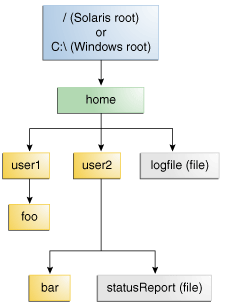
statusReport file in the previous figure is described by the following notation in the Solaris OS:/home/sally/statusReport
In Microsoft Windows,
statusReport is described by the following notation:C:\home\sally\statusReport
The character used to separate the directory names (also called the delimiter) is specific to the file system: The Solaris OS uses the forward slash (
/), and Microsoft Windows uses the backslash slash (\).Relative or Absolute?
A path is either relative or absolute. An absolute path always contains the root element and the complete directory list required to locate the file. For example,/home/sally/statusReport is an absolute path. All of the information needed to locate the file is contained in the path string.A relative path needs to be combined with another path in order to access a file. For example,
joe/foo is a relative path. Without more information, a program cannot reliably locate the joe/foo directory in the file system.For More details on Path class or detailed tutorial Visit This Page
This post is not a tutorial but rather I have written down a code which uses Path and shows the output of its different methods. Here's the code :-
Returns the absolute path :-/home/psycho_coder/NetBeansProjects/Miscel/src/data/en Returns Real Path with Sym Links removed :/home/psycho_coder/NetBeansProjects/Miscel/src/data/en Returns the normalized path /home/psycho_coder/NetBeansProjects/Miscel/src/data/en Returns the parent directory in which the file is present :/home/psycho_coder/NetBeansProjects/Miscel/src/data Returns the root directory :/ Returns the file name :en Number of Name elements in the path 7 Resolves the given path against this path's parent path:/home/psycho_coder/NetBeansProjects/Miscel/src/data/en Returns a subpath of the main path :Miscel/src/data/en Returns the File path in a URL format : file:///home/psycho_coder/NetBeansProjects/Miscel/src/data/en
Write a File using Java NIO
TheUnknown Saturday, June 13, 2015 File Read and Write, Java, Java 7, Java NIO No comments ![]()
The following example shows how to write a file using Java NIO. It
creates a file named loginlist.txt, if the file already exists then it
will remove it. The following code also generate random strings of arbitrary length. The strings are written in the following format :-
<Random Strings> : <Random Strings>
It writes 10 million entries and takes 32 seconds in my PC (Intel Core i3 2nd Gen, RAM - 4 GB) to complete and file size reaches to about 180 MB.
<Random Strings> : <Random Strings>
It writes 10 million entries and takes 32 seconds in my PC (Intel Core i3 2nd Gen, RAM - 4 GB) to complete and file size reaches to about 180 MB.
Subscribe to:Posts ( Atom )
Follow Me!
Popular Posts
Categories
- Algorithms(17)
- C And C++(2)
- Code Library(12)
- Computer Forensics(10)
- Data Structure(16)
- Fractal(5)
- GameDev(6)
- General(4)
- Information Security(14)
- Java(23)
- JavaScript(3)
- Linux(9)
- Programming(40)
- Python(16)


